Post · 5 min read · 5 November 2026 · Irfan
M3U file format: #EXTINF and tvg tags explained
Open an M3U playlist and it's mostly #EXTINF lines. Here's what each tag means, from tvg-id and tvg-logo to group-title, and how Bigplay uses them.
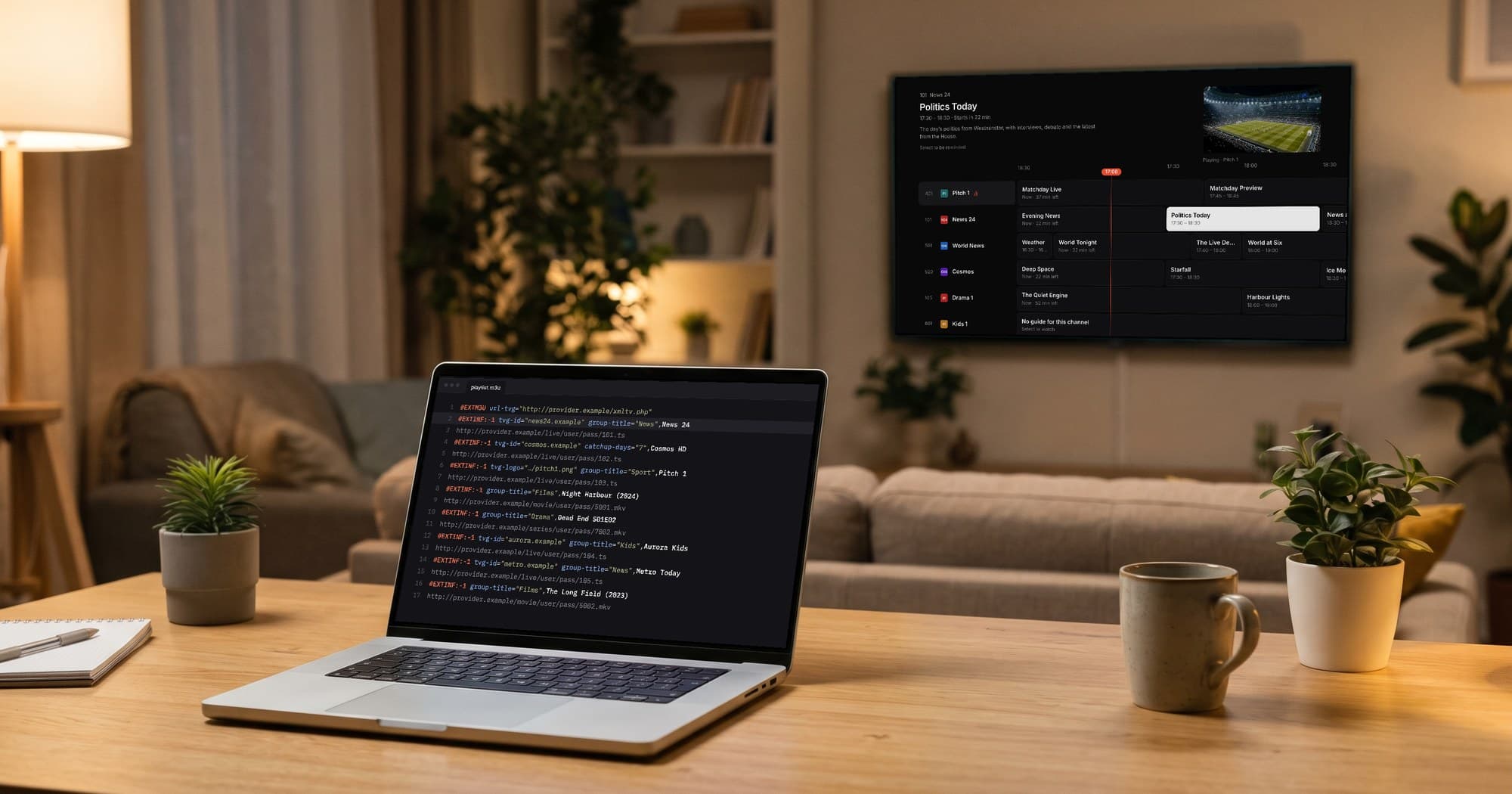
Open an M3U playlist in a text editor and it looks like a wall of code: lines starting with #EXTINF, tags like tvg-id and group-title, and long web addresses. It's simpler than it looks. Each channel, film or episode takes two lines, and the tags just describe it.
Here's what each part means, and what Bigplay does with it.
A short example
This is a made-up playlist with two channels, a film and an episode. Real ones work the same way, just with thousands of entries.
#EXTM3U url-tvg="http://provider.example/xmltv.php"
#EXTINF:-1 tvg-id="news24.example" tvg-name="News 24" tvg-logo="http://provider.example/logos/news24.png" group-title="News",News 24
http://provider.example/live/username/password/101.ts
#EXTINF:-1 tvg-id="cosmos.example" tvg-logo="http://provider.example/logos/cosmos.png" group-title="Entertainment" catchup="default" catchup-days="7",Cosmos HD
http://provider.example/live/username/password/102.ts
#EXTINF:-1 tvg-logo="http://provider.example/posters/night-harbour.jpg" group-title="Films",Night Harbour (2024)
http://provider.example/movie/username/password/5001.mkv
#EXTINF:-1 group-title="Drama",Dead End S01E02
http://provider.example/series/username/password/7002.mkv
The first line: #EXTM3U
Every M3U playlist starts with #EXTM3U. It tells the player this is an extended M3U file, the kind that carries names and tags rather than bare addresses.
The same line can also point to a TV guide, with url-tvg or x-tvg-url. If your provider puts a guide link there, Bigplay finds it and loads the guide by itself. If not, you can add one separately: How to add a TV guide (EPG) to an IPTV playlist shows where.
The #EXTINF line
Each entry starts with an #EXTINF line, and the line after it is the address of the stream itself. The #EXTINF line has three parts:
The number after the colon is the length in seconds.
-1means it has no end, which is how live channels are marked.The tags in the middle, written as
name="value", describe the entry.The text after the last comma is the name you see in the app.
What each tag means
tvg-id: the channel's ID in the TV guide. This is what links a channel to its listings. Bigplay matches on this first, and falls back to the channel name when the ID is missing or doesn't match.
tvg-name: the channel's name as the guide knows it. Often the same as the display name.
tvg-logo: a link to the channel logo, or the poster for a film. Without it, the entry shows without artwork.
group-title: the category, such as News or Films. Bigplay turns each group into a category you can browse. Entries with no group end up in Uncategorized. Some playlists use a separate
#EXTGRPline instead, and Bigplay reads that too.catchup, catchup-days and catchup-source: whether you can go back and watch earlier programmes on that channel, and for how many days. This only works if your provider keeps them.
tvg-country, tvg-language and tvg-chno: the country, language and channel number. They're extra information, and many playlists leave them out.
How Bigplay sorts Live TV, Films and Series
An M3U file doesn't have a single field that says "this is a film". So Bigplay looks for clues:
The address comes first. Most providers put
/live/,/movie/or/series/in their stream links, and that settles it.Then the length and the name. An entry marked
-1is treated as a live channel, a name with a season and episode number likeS01E02makes it an episode, and anything else is a film.On iPhone, iPad and Apple TV, the file type too. An address ending in a video file like
.mp4or.mkvalways counts as a film or an episode, even when it's marked-1.
Episodes of the same show are grouped into one series, using the name before the S01E02 part. So if a show's episodes are spelled differently from one line to the next, they can end up as separate series.
When a playlist looks wrong
It won't load at all. If the link returns a login page or an error message instead of a playlist, there's no
#EXTM3Uto read. That usually means the link has expired, or the username or password in it has changed. IPTV playlist won't load? goes through each error.Everything is in one category. The playlist has no
group-titletags. Ask your provider whether they offer a version with groups, or use their Xtream Codes login instead.Channels play, but the guide is empty. The
tvg-idvalues don't match the IDs in the guide file. Your provider controls both, so they're the ones who can fix it.Accented names look garbled. The file isn't saved as UTF-8. On Apple devices Bigplay also reads the older Western European encodings many panels still use, but anything else can show odd characters. Your provider can export the playlist as UTF-8.
Films show up under Live TV. Their addresses don't say
/movie/and they're marked-1, so they look like channels. Ask your provider whether they have an Xtream Codes login, which keeps films and channels apart.
Keep your playlist private
Look at the addresses in the example again: each one contains a username and password. Real playlists do too, so anyone with your M3U link or file can use your account. Don't post it in forums or share it in screenshots.
For the same reason, be careful with "free" playlists found online. They're usually someone else's account, they stop working without warning, and they're often not legal to use. Bigplay is a player. It doesn't include any channels or content, and it's built for playlists you already have the right to use.
Where to go next
If your provider offers both an M3U link and a login, read M3U or Xtream Codes: what's the difference? before you choose. When you're ready, Bigplay plays your M3U playlist on iPhone and iPad, Apple TV and Android and Android TV.
More from the blog
Post · 6 min read
IPTV channel won't play? What each message means
What each IPTV playback message means in Bigplay, from isn't responding to the stream ended early, and the checks and settings that get a channel playing.
24 November 2026
Post · 5 min read
Find your Xtream Codes server, username and password
Your IPTV provider sent a server, username and password, or one long link. Where to find each part, how to read them from an M3U link, and what to type.
24 November 2026

Post · 3 min read
IPTV playlist won't load? What each error means
IPTV playlist won't load? What the common errors really mean, from wrong logins and expired accounts to connection limits, and what to do about each.
31 October 2026
Go on. Press play.